
How Can I Make a QR Code for Event Photos
So, you want to create a QR code for your event photos? The best way is to use a specialized online platform that whips up a unique code linked to a private, shareable gallery.
This lets your guests instantly upload photos right from their phone’s browser. The best part? No app download is required. The whole point is to make it dead simple, seamlessly consolidating every captured moment into one place without any fuss.
How to Get Every Single Guest Photo, Instantly
Picture this: you're planning the perfect wedding. Every detail is locked in, from the flowers to the playlist. But one nagging thought keeps popping up—how are you going to get all those candid, amazing photos your guests take on their phones?
We've all been there. Chasing down friends and family for pictures after the party is a total pain. You end up with a messy collection scattered across a dozen different phones, text threads, and social media feeds.
It's a huge headache for anyone hosting an event. You just want a single, private gallery filled with every laugh, dance move, and special moment from every table. The logistics, though? They feel like a nightmare. How do you make it easy enough for everyone—from your tech-savvy cousin to your grandma—to chip in without hitting a wall?
The Modern Fix for Collecting Event Photos
The answer is a simple but incredibly effective tool: a QR code designed specifically for photo sharing.
Platforms like WedPicsQR were built to solve this exact problem, making photo collection feel effortless and immediate. The core idea is to remove every single obstacle for your guests. Instead of asking them to download an app, create an account, or remember a hashtag, you just give them something to scan for instant photo uploads.
By linking a QR code directly to an upload page, you empower guests to share their best shots the second they take them. This drives up participation and makes sure no great memory gets lost. The process is as simple as it gets: point, scan, and upload.
This approach isn't just a lifesaver for your guests; it's a total game-changer for you. No more piecing together your event's story from a dozen different sources. Every photo automatically lands in one beautiful, organized gallery, all in real time. It's the most seamless way to consolidate photos.
It's Not Just for Weddings
While this is a perfect match for weddings, its versatility extends to pretty much any gathering you can think of. The fundamental need—collecting photos from a group of people easily and instantly—is universal.
Think about these scenarios:
- Corporate Gatherings: Easily pull together photos from team-building events, holiday parties, or conferences into a shared company album with a simple scan.
- Birthday Parties: Capture every moment of a milestone celebration, from the birthday toast to that final group shot, without requiring guests to download an app.
- Family Reunions: Create a lasting digital archive of your family's get-together that everyone can add to and enjoy for years.
- Anniversaries and Graduations: Seamlessly consolidate memories from major life events into a single, easily shareable collection.
In every case, the principle is the same. You can display your event’s QR code at the venue entrance or on invitations for instant photo uploads, turning every guest into a contributor. This one simple scan transforms the chaotic task of photo collection into a smooth, enjoyable experience. It frees you up to relax and enjoy the occasion, knowing that every memory is being saved.
Create Your Photo Sharing QR Code in Minutes
So, how do you actually make a QR code that solves your event photo problems? The whole process is shockingly fast and, I promise, requires zero technical skill. If you use a platform built for events, you can go from an idea to a working, shareable QR code in just a few clicks.
Forget about fiddling with complex software or confusing settings. You just start by setting up a simple, personalized event page. This could have the couple's names and wedding date, or maybe the name of a corporate retreat. This page becomes the home base for every single photo your guests contribute.
Once that's done, the platform instantly generates a unique QR code linked directly to your page. With WedPicsQR, for example, the moment you create your event gallery, your custom QR code is ready to download. It’s a completely seamless jump from concept to a real, usable tool.
This flowchart really nails the two paths for event photo sharing—the old, frustrating way versus the simple QR code solution.
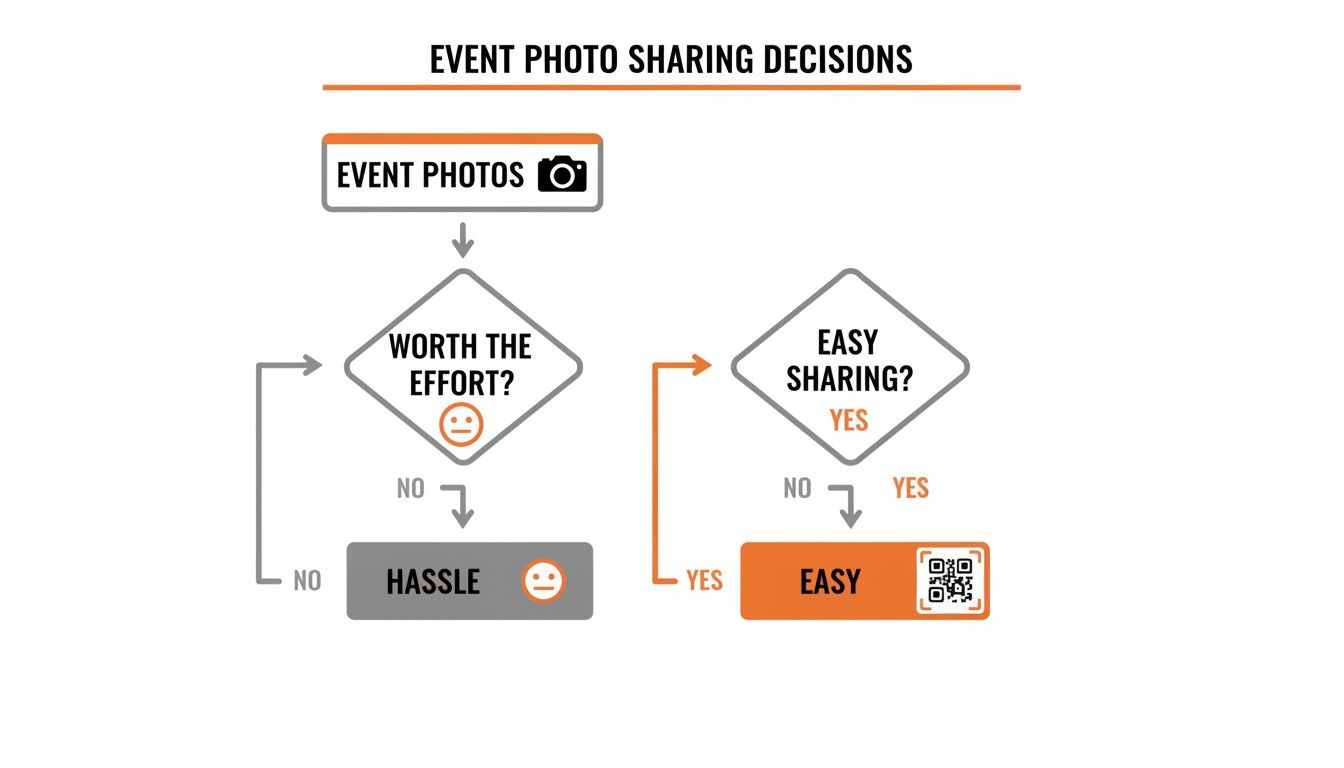
As you can see, grabbing a QR code puts you on the direct path to an easy, consolidated experience. You get to skip all the common headaches of chasing down photos after your event is over.
The App-Free Advantage
The real magic here is the incredible ease of use for your guests. When someone scans the code, they land on a clean, simple upload page right in their phone’s web browser. There are no apps to download, no accounts to create, and no passwords to remember. This removes pretty much all the friction.
Guests just scan, tap 'upload,' and pick photos from their camera roll. The pictures pop up in your private gallery instantly, creating a real-time stream of memories as the event happens.
This app-free method is a massive win. While weddings are a perfect use case, its versatility makes it just as good for birthdays, corporate gatherings, and family reunions. Any event where you want to seamlessly consolidate photos from everyone becomes a whole lot simpler.
The core idea is universal access. By ditching the need for an app, you ensure that every single guest—no matter how tech-savvy they are—can participate without a second thought. It's the key to getting the maximum number of photos.
Static vs Dynamic QR Codes for Your Event
Before you jump in, it's helpful to know there are two main types of QR codes. For any kind of event, one is a clear winner.
| Feature | Static QR Code | Dynamic QR Code (Recommended for Events) |
|---|---|---|
| Link Destination | Fixed and cannot be changed after creation. | Can be edited and updated anytime. |
| Tracking & Analytics | No tracking available. | Tracks scans, locations, and devices. |
| Real-World Example | A link to a permanent business website. | A link to your wedding gallery that you might update. |
| Mistake-Proof? | No. A typo means you have to create a new one. | Yes. You can fix typos in the destination URL. |
| Best For | Information that never changes. | Events, marketing campaigns, and changing content. |
Dynamic QR codes are the way to go for events. They give you the flexibility to make changes and see how many people are actually scanning your code.
Why This Method is So Effective
The power of QR codes isn't just a fleeting trend; it's backed by some serious growth. From 2021 to 2025, overall usage is projected to rocket by 323%. In the U.S. alone, the number of people scanning QR codes grew from 68.9 million in 2020 to an expected 100 million by 2025. This huge adoption rate means your guests already know what to do.
For weddings and other big moments, this translates to incredible convenience. A dedicated QR code links everyone to a private gallery where they can upload pictures right away. Premium services often include neat features like duplicate photo removal and priority support. You can learn more about getting the most out of a QR code generator for events in our detailed guide.
This system gathers every candid moment into one organized album. Instead of memories scattered across dozens of phones and social media feeds, you get one cohesive story of your special day, told from everyone's perspective.
And once you get the hang of creating QR codes for photos, you might find other uses for them. Learning about creating a WhatsApp link, including advanced QR codes is another great way to connect with people using simple, scannable tech.
Design a QR Code That Matches Your Event Style
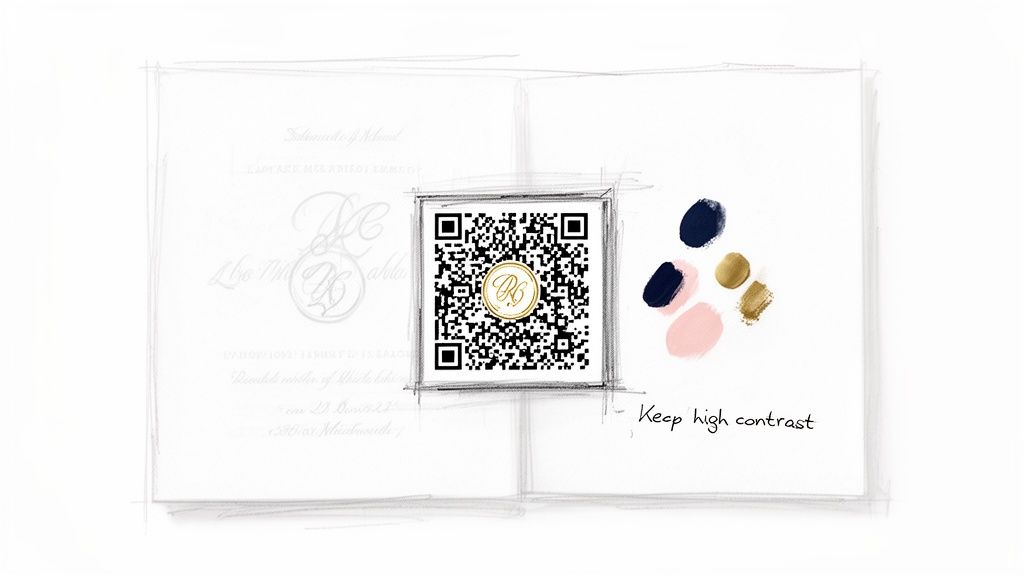
Long gone are the days of the clunky, black-and-white QR code. When you make a QR code for your wedding or another big event, it should feel like a natural part of the decor—not some techy afterthought. Customizing your code is a surprisingly simple way to make the whole photo-sharing experience feel more integrated and elegant.
Think of your QR code as just another piece of your event stationery. You wouldn't just slap any old font on your invitations, right? You can apply those same design principles here. That small touch shows your guests you've thought about every detail, making the act of sharing photos feel that much more special.
Infuse Your Brand into Every Scan
Personalization is everything, especially for an event as unique as a wedding. Platforms like WedPicsQR make it incredibly easy to ditch the default design. The whole point is seamless customization, letting your code perfectly reflect your event's theme, whether that's a rustic barn wedding or a sleek corporate party.
Here are a few easy ways to make that QR code your own:
- Custom Colors: Swap out the standard black for colors that match your event’s palette. A deep navy QR code on a blush pink card looks amazing and still works perfectly.
- Add a Logo: Pop your wedding monogram, company logo, or even just a fun icon right in the center. This immediately signals to guests what the code is for and reinforces your event's branding.
- Include a Call-to-Action Frame: Don't make people guess. A simple frame around the code with text like "Share Your Photos" or "Scan to Upload" can seriously boost how many people actually use it.
The Art and Science of a Scannable Design
While it’s fun to get creative, the code’s number one job is to be scannable. A beautiful QR code that doesn’t actually work is just a fancy decoration. The most critical factor here is contrast. Your phone's camera has to be able to clearly tell the dark parts of the code from the light parts.
Pro Tip: A good rule of thumb is to maintain a high contrast ratio. If you're using a light background, choose a dark color for the code itself, and vice versa. Steer clear of light-on-light combos like yellow on white or dark-on-dark like navy on black.
The fact that QR codes are showing up everywhere proves how well they work. By 2025, it's expected that over 90% of marketers will have used QR codes in their campaigns. Even better, dynamic codes—the kind that power WedPicsQR's customizable pages—are projected to claim a 65% market share. This boom means your guests are already pros at scanning, making the process smooth for everyone. You can read more about these QR code statistics to see just how much they’re changing events.
Practical Examples for Any Occasion
Customization isn't just for "I do's." The ability to brand your QR code makes it a powerful tool for all kinds of events, ensuring it complements the atmosphere instead of clashing with it. This versatility is key for everything from corporate gatherings to family reunions.
Event-Specific Customization Ideas
| Event Type | Customization Idea | Why It Works |
|---|---|---|
| Birthday Party | Use the birthday person's favorite colors and add a small cake or balloon icon in the center. | Makes the photo-sharing feel like a fun, personalized part of the celebration. |
| Corporate Event | Incorporate the company's official brand colors and place the business logo in the middle. | Reinforces brand identity and gives the QR code a professional, polished look. |
| Family Reunion | Design the code with colors from a family crest and add the family name. | Creates a sense of unity and heritage, making the photo album even more meaningful. |
By personalizing your QR code, you turn a functional tool into a beautiful, integrated part of your event. It puts the power in your hands, letting you create a code that not only works perfectly but also looks the part. This small step ensures every guest feels invited to contribute, helping you build a complete photo gallery with absolutely no app required.
Get Your QR Code Seen: Strategic Placement for Maximum Scans
You've designed the perfect QR code. Now for the most important part: putting it where your guests will actually see and use it. Making the code is just step one; real success is measured in scans and a gallery overflowing with photos.
The trick is to think beyond a single sign at the entrance. You need to weave the QR code into the fabric of your event, making it so ridiculously convenient that guests can share photos without a second thought. This means hitting multiple high-traffic, high-visibility spots where people will have their phones out and a moment to spare.
Prime Locations for Your Event QR Code
Smart placement turns your QR code from a simple decoration into a powerhouse photo-collection tool. Think about the natural flow of your event—where will guests gather, pause, or sit down? Those are your golden opportunities.
Here are a few can't-miss spots:
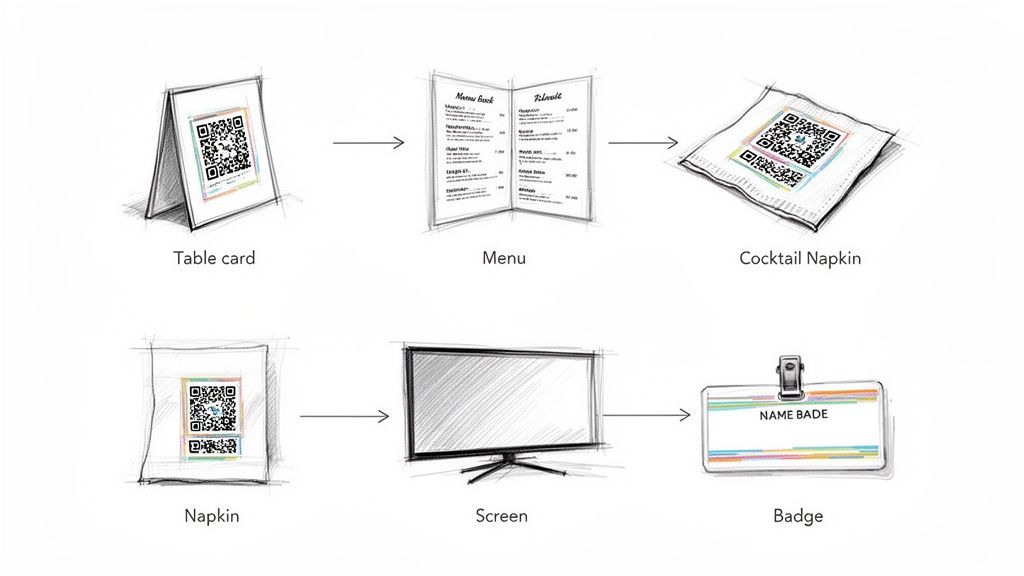
- The Welcome Point: Put your QR code right at the venue entrance or on the welcome sign. It’s the first thing guests see, setting the expectation for photo sharing right from the start.
- On Every Table: This one is a no-brainer. Print the code on small, elegant cards and place one on each reception table. It's right there in front of them during dinner and toasts, making it almost too easy to scan and upload.
- Inside the Menu: Tuck the QR code onto the back of the dinner menu or on a small card placed with the napkin. It’s a subtle but surprisingly effective way to catch someone's eye.
Think Outside the Box with Placement
While the standard spots work wonders, don't be afraid to get creative. Making photo sharing feel like a fun, integrated part of the experience is what gets you the best candid shots. Weddings are a popular use case, but these ideas work for any kind of party, from corporate gatherings to birthdays.
For a birthday bash, print the code on cocktail napkins or party favor tags. At a corporate event, add it to name badges so every attendee has it on them all day. You could even project a large version onto a screen near the dance floor or bar, rotating it with other event info.
The goal is simple: make the QR code unavoidable but not intrusive. When you weave it seamlessly into your event, you make it effortless for guests to contribute. That's how a good party becomes a perfectly captured memory.
This strategy is exploding in popularity for one reason—it works. Global QR code usage is projected to surge by a staggering 323% between 2021 and 2025. In the U.S. alone, nearly 83.4 million adult smartphone users scanned a QR code in 2022, and that number is expected to hit 102.6 million by 2026. Your guests already know what to do when they see one.
Versatility Across All Your Events
The real beauty of using a QR code for photo sharing is how adaptable it is. It's a fantastic solution for weddings, but its power extends to just about any gathering you can think of.
Placement Ideas for Different Events
| Event Type | Creative Placement Ideas | Why It's Effective |
|---|---|---|
| Wedding | On table number cards, the back of the program, or a sign at the gift table. | Integrates seamlessly with existing decor and captures moments throughout the day. |
| Corporate Event | On name badges, presentation slides, or tabletop displays near the coffee station. | Professional and convenient, allowing for easy collection of team and event photos. |
| Birthday Party | On custom drink coasters, party favor bags, or a banner near the cake. | Fun and informal, encouraging guests to share candid shots during the celebration. |
| Family Reunion | On a "family tree" display, the event schedule, or small cards in a welcome basket. | Creates a central hub for memories and makes it easy for all generations to contribute. |
The more touchpoints you create, the more photos you'll collect. By being strategic, you can dramatically increase your photo count and ensure every memory is saved to your private gallery. For more inspiration, check out our guide on 10 creative QR code display ideas for events in 2024.
Test Your QR Code Before the Big Day
You've designed a beautiful, on-brand QR code and scouted the perfect spots to put it. But before you call it a day, there's one last, absolutely critical step. A quick five-minute test is your best insurance against any day-of technical hiccups.
This isn’t about running complex diagnostics; it's a simple confidence check. You just want to know that when your guests scan the code, everything works exactly as planned. After all, the whole point is an effortless photo-sharing experience, and this quick test guarantees you deliver on that promise.
Your Simple Pre-Event Testing Checklist
Grab your phone, maybe a friend’s, and run through these quick checks. It’s always best to test the actual printed materials you’ll be using, whether that’s a table card, a big sign, or even a cocktail napkin.
- Test with Different Phones: Scan the code with both an iPhone and an Android. While the tech is universal, different phone models and camera software can sometimes behave slightly differently. This quick check confirms everyone can join in.
- Use Various Camera Apps: Most modern phones scan QR codes right from the native camera app. But some guests might use a third-party scanner app. If you can, test with both to make sure the code is easily recognized by anything thrown at it.
- Confirm the Destination: This is the big one! Does the scan take you directly to the correct photo upload page for your event? Make sure it loads quickly and the "upload" button is obvious, reinforcing that app-free, instant experience.
This simple process confirms that from the moment a guest scans the code, their journey to sharing photos is seamless and intuitive.
Common QR Code Mistakes to Avoid
During your test run, you might stumble upon a few common issues that can mess with scannability. Catching these problems beforehand is key to avoiding guest frustration when it really matters. Here are the most frequent culprits to watch out for.
Key Takeaway: Most QR code failures are physical, not technical. Things like size, contrast, and placement cause the vast majority of scanning errors. A simple visual check and a test scan can prevent these problems entirely.
Pay close attention to these three factors:
- Printing Too Small: A QR code has to be large enough for a phone’s camera to focus on it properly. The absolute minimum recommended size is 2 x 2 cm (about 0.8 x 0.8 inches). If guests need to scan it from a few feet away, it needs to be significantly larger.
- Using Low-Contrast Colors: As we talked about in the design section, good contrast is non-negotiable. A light yellow code on a white background or a navy code on a black background is basically invisible to a scanner. Your test will immediately tell you if there isn't enough of a difference between your foreground and background colors.
- Placing It Behind Reflective Surfaces: Putting your QR code behind glass or a glossy plastic frame is asking for trouble. The glare can make it impossible for a camera to get a good read. If you can, test your code in the actual lighting conditions of your venue to check for reflections. If you're having trouble scanning a code from a picture on your screen, you can learn more about how to scan a QR code from a picture, which highlights similar challenges.
What To Do After The Party's Over
The best part about using a QR code for your event photos is what happens after the last guest has gone home. Instead of the usual chaos of chasing people down for their pictures, you're left with a perfectly consolidated gallery.
This is a game-changer for weddings, but its versatility makes it just as brilliant for corporate events, big birthdays, or family reunions. You get to skip the messy collection phase and jump straight to the fun part: reliving and sharing all those amazing moments.
Your Complete Photo Story, Ready to Go
Platforms built for this, like WedPicsQR, are designed to make the "what next?" part incredibly simple. Forget sifting through a jumbled mess of images. You get a clean, organized album with some seriously useful features.
Here’s what you can usually do:
- High-Resolution Downloads: Grab every single photo in its original, high-quality format with just one click. This is perfect for creating a complete backup of every memory your guests captured.
- Duplicate Removal: Smart tools can automatically find and get rid of duplicate or nearly identical shots. This cleans up your gallery so only the best images remain.
- Instant Sharing: Create a single link to the entire album. It's the perfect way to share the day with friends and family who couldn't make it, giving them a front-row seat to all the action.
Because guests don't need to download an app to upload their photos, the whole process is ridiculously simple from start to finish. This means more participation and a more complete, seamlessly consolidated collection for you.
This whole approach lets you move straight to enjoying the memories. You can easily find specific pictures, put together a slideshow, or just scroll through the day's events from everyone's unique perspective. It’s a modern solution that saves you time and keeps your memories accessible for years to come.
If you want to learn more about what to look for, we have a great breakdown of what makes a good event photo sharing platform.
Common Questions About Event Photo Sharing
So, you're thinking about using a QR code to gather photos at your event. It’s a great idea, but a few questions probably pop into your head right away. Let's walk through the common concerns to make sure you feel totally confident this is the right move for you.
The whole system is designed to be ridiculously easy, so every single guest can add to your photo collection.
Do My Guests Need to Download an App?
This is the big one, and the answer is a huge relief: no, guests do not need to download any special app.
That's the magic of it. They just point their phone's camera at the code, and a private upload page pops up in their web browser. This simple step removes the single biggest roadblock to getting photos from people. No accounts, no passwords, no App Store—just scan and share. It’s instant and works for everyone, emphasizing the ease of use.
Will It Work for Everyone's Phone?
What about your aunt who's still rocking an older iPhone? Or your cousin with a less-common Android? No problem.
Modern photo-sharing QR codes are built to be universal. As long as a phone has a camera and a web browser—which is pretty much every smartphone made in the last decade—your guests are good to go.
This means you can stop worrying about compatibility. It doesn't matter if it's an iPhone or an Android, brand new or a few years old. The goal is to get all your photos in one place without any tech headaches.
How Private is This, and Are There Photo Limits?
Privacy is a massive deal, especially for personal events like a wedding or a milestone birthday. When you set up your gallery, you're in the driver's seat. You can password-protect your album to make sure only your guests can see and upload photos. This keeps your memories safe and sound, just for the people who were there.
And what about a photo limit? Most dedicated services, especially premium plans like WedPicsQR, offer unlimited photo uploads. This is huge because it encourages everyone to share freely. You’ll get everything from the first toast at your party to the last song on the dance floor.
The whole process is built on simplicity. No app to download, works on any phone, and you have total control over privacy. It’s the best way to gather every precious memory from your event into one amazing, consolidated collection.
While weddings are the primary focus, this is just as perfect for corporate events, family reunions, and big birthday bashes. You can put the QR code right at the entrance or on every table, turning every guest into a contributor. You get the full picture of your celebration without chasing anyone down for photos later.
Ready to create a beautiful, private photo gallery for your event in just a few minutes? With WedPicsQR, you can generate a custom QR code that lets guests instantly upload photos with no app required. Start your free gallery today!