
Create a Guest Book Photo Sign Your Guests Will Actually Use
A guest book photo sign is the modern answer to that dusty, forgotten guest book. Instead of just collecting signatures, it uses a simple QR code to let guests upload their photos from your event directly into a private online gallery. It’s all about swapping a book of names for a vibrant, crowdsourced album full of candid, in-the-moment memories, with a focus on absolute ease of use.
Why a Photo Guest Book Sign Beats a Traditional Book
Let's be real—the traditional guest book usually ends up on a shelf, filled with signatures but missing the actual vibe of your special day. A modern guest book photo sign, on the other hand, is a total game-changer, primarily for weddings, but versatile enough for any event host.
This approach turns a passive task—signing your name—into something fun and collaborative. Instead of just a list of who showed up, you get to see the entire celebration through your guests' eyes. Think of all the candid smiles, goofy dance moves, and behind-the-scenes moments you might have missed otherwise, all consolidated seamlessly.
Traditional Guest Book vs. QR Code Photo Sign
To really see the difference, let’s put them side-by-side. One is a classic, but the other is built for how we capture memories today, with a focus on simplicity and instant gratification.
| Feature | Traditional Guest Book | Guest Book Photo Sign (with QR Code) |
|---|---|---|
| Guest Interaction | Passive (just sign a name) | Active & Fun (snap and share photos) |
| Type of Memory | A list of signatures | A visual gallery of candid moments |
| Ease of Use | Simple, but requires a pen | Incredibly easy: just scan a QR code—no app needed |
| Participation | Often low; guests can forget | High, due to instant and effortless uploads |
| Accessibility | Stored in a physical book | Instantly viewable online gallery |
| End Result | A book on a shelf | A shareable, living digital album |
The takeaway is clear: if you want a living, breathing collection of memories instead of a static list of names, the QR code sign is the way to go.
Embrace the Ease of Instant Memories
The real magic is how simple it is. With a good QR code solution, there's no app for guests to download and no clunky login process to deal with. They just scan, snap, and share. It’s a seamless process that guarantees way more people will actually participate. You can pop your QR code right at the entrance or even on the tables for instant uploads all night long.
This shift toward interactive keepsakes isn't just a hunch. We're seeing it everywhere—in fact, 72% of brides now prefer a photo booth over a traditional guest book, which just goes to show how much people want more engaging ways to capture memories.
A guest book photo sign does more than collect images; it builds a collective story of your event, told from dozens of unique perspectives. It’s about creating a complete, authentic, and easily accessible archive of your celebration through seamless QR code technology.
Perfect for Weddings and Beyond
While this idea is a home run for weddings, its versatility is a huge plus. This simple tool can be adapted for pretty much any gathering:
- Birthday Parties: Capture every laugh and cheer as friends and family celebrate another year.
- Corporate Gatherings: Collect team-building moments and conference highlights in one central, private spot.
- Family Reunions: Effortlessly pull together photos from every branch of the family tree.
At the end of the day, choosing a photo sign is about wanting more than just names on a page; it’s about preserving the feeling of the day. And once you have all those amazing photos, you can turn them into personalized photo gifts that become truly lasting keepsakes.
If you're still weighing your options, take a deeper look at the differences between digital vs. traditional photo collection methods to see what fits your event best.
Setting Up Your Digital Gallery for Instant Photo Uploads
Before anyone can start snapping and sharing pictures, you need a place for all those memories to land. This is your digital home base—a private online gallery. The good news? Getting it set up is incredibly fast and simple. With a service like WedPicsQR, you can create a unique QR code in just a few minutes, ready to pop onto your guest book sign.
The single most important feature here is the app-free experience. Think about it: guests don't have to download anything or create an account. This one detail is the secret sauce for getting lots of photos, because it removes all the usual friction that makes people give up. They just scan, and they're in.
Making It Effortless for Everyone
When it comes to getting guests to participate, simplicity is your best friend. The entire process is designed to be second nature for everyone, from your tech-savvy cousin to your grandma. A quick scan with their phone's camera instantly opens a private upload page right in their web browser.
This seamless approach is how you collect photos from the widest range of guests possible. For example, display your event’s QR code at the venue entrance or on invitations for instant photo uploads. That’s all it takes to start collecting photos effortlessly.
Here’s a look at the clean, simple interface guests will see. It makes the whole process feel immediate and easy. As you can tell, the focus is all on a clear call to action. It guides guests without any confusing steps or unnecessary clutter.
Personalizing Your Photo Gallery
Your digital gallery shouldn't feel like a generic file folder. Taking a moment to personalize it with a warm welcome message, the event date, and your names adds a professional yet heartfelt touch. It's a small step that makes guests feel more connected to the experience, turning a simple file-drop into a shared, branded event album.
Here are a few ideas to make it your own:
- A Custom Welcome Message: Something short and sweet works best, like, "Welcome to our wedding! Snap, share, and help us capture every moment."
- Event Details: Clearly display the event name (e.g., "The Smith & Jones Wedding") and the date.
- Branded Look and Feel: If you can, match the gallery’s colors or theme to your event’s aesthetic for a really cohesive experience.
As you're planning your digital gallery, it's also smart to think about how it complements your professional photography. Many photographers, like Arvak Digital Photographer Videographer Mauritius, are pros at digital capture and their work can integrate beautifully with modern, crowdsourced photo solutions.
By making the photo upload process this easy and personal, you aren't just hoping for a few extra pictures. You are actively ensuring a high participation rate and creating a complete, consolidated collection of cherished moments in one beautiful online album.
While this system is a perfect fit for weddings, its versatility shines across any celebration. The same easy, app-free process works wonders for birthdays, corporate gatherings, reunions, and more. For those of you planning your big day, you can explore more ideas on setting up the perfect wedding photos gallery to make sure no memory gets left behind.
Designing a Sign That Gets Noticed and Drives Action
A great guest book photo sign has to do more than just look pretty—it needs to grab your guests' attention and make them want to share their pictures. Think of it as your personal marketing campaign for collecting candid moments. Every detail, from the material you choose to the words on the sign, plays a part in getting everyone to pull out their phones.
The physical design itself sets the immediate tone. An elegant acrylic sign is perfect for a modern, chic wedding, while a classic framed print feels right at home with more traditional decor. If you're looking for something budget-friendly that still looks sharp, a professionally printed sign mounted on a sturdy foam board is a fantastic option. The goal is to make it feel like a natural part of your event's vibe, not a last-minute add-on.
Choosing the Right Wording
The words on your sign are your direct call to action, so you need to be friendly, clear, and quick. Long, complicated instructions are a surefire way to have guests just walk on by. Instead, go for short, punchy phrases that get straight to the point and highlight how easy it is to use.
Here are a few templates that have worked wonders for all kinds of events:
- For Weddings: “Scan, Snap, Share! Help us capture every moment of our special day. No app needed!”
- For Birthdays: “Caught on Camera! Scan the QR code to add your photos to the birthday album.”
- For Corporate Gatherings: “Share Your Perspective! Help us document this year’s event by uploading your photos here.”
See the pattern? The message is always the same: it's simple, it's instant, and we really want to see your pictures. This approach makes participation feel totally effortless.
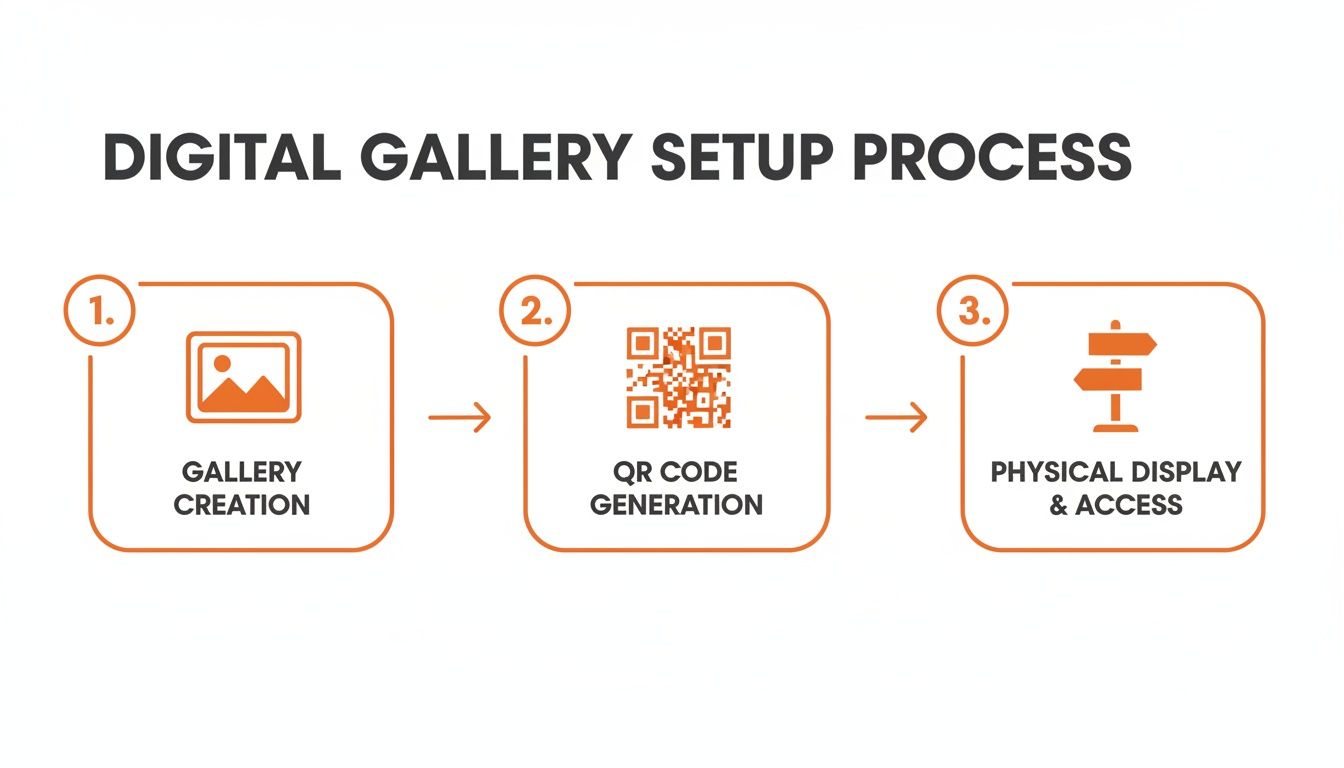
As you can see, the path from creating a digital album to having a physical sign ready for guests is incredibly straightforward. It really is that fast.
Making the QR Code Front and Center
Your QR code is the star of the show here. It needs to be big, bold, and easy to scan from a comfortable distance. A high-contrast design—like a classic black code on a white or light-colored background—is non-negotiable if you want it to work reliably for everyone.
Pro Tip: Please, please, please test your QR code before you send the sign off to the printer. Print it out on a piece of paper at the exact size it will be on the final sign. Then, have a few different people scan it with different phones (both iPhone and Android) to make sure it works flawlessly.
A perfectly functional QR code is the key to the seamless consolidation of photos. Guests can scan it at the entrance, on their tables, or even on your invitations to start uploading instantly, no hassle required. This immediate access is what drives such high participation, whether you're at a wedding, a family reunion, or a professional conference. For some extra creative inspiration, check out our guide on 10 creative QR code display ideas for events.
Strategic Placement to Maximize Photo Contributions
A stunning, well-worded sign is fantastic, but its true power lies in being seen. A brilliant guest book photo sign tucked away in a low-traffic corner won’t collect many memories. To really maximize those photo contributions, you need to think like an event planner and place your signs in high-traffic hotspots where guests naturally gather and linger.
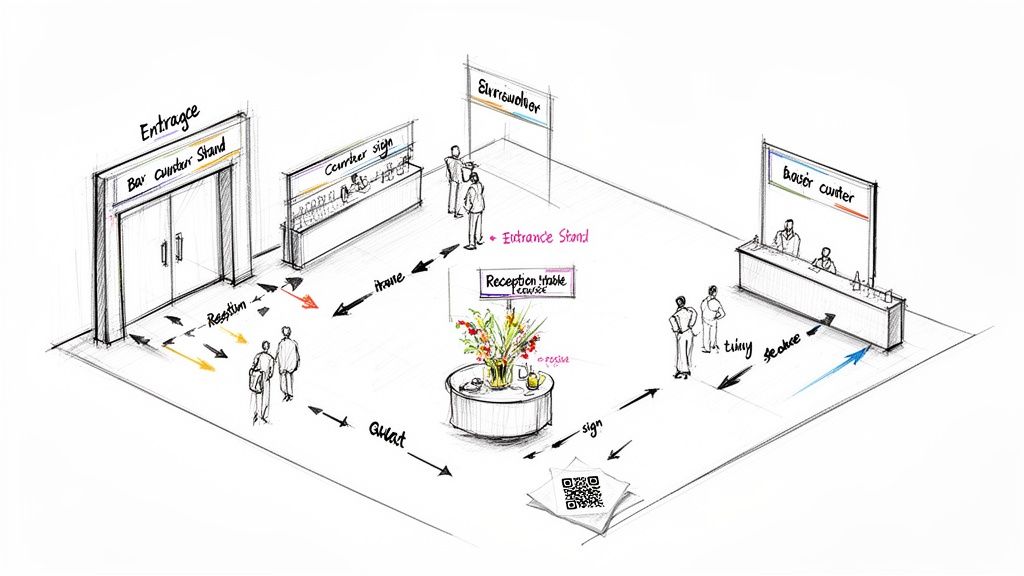
The goal here is to weave photo sharing right into the event’s natural rhythm. The whole process is designed for ease of use—the instant photo uploads through a simple QR code scan mean you just need to put the opportunity in front of your guests. Since there’s no app requirement, the process is so quick that people are far more likely to participate right on the spot.
Prime Locations for Your Main Sign
Think about the path your guests will take as they move through your event. You want to create multiple touchpoints, making it almost impossible for them to miss the invitation to share their photos. A larger, more prominent sign works best in these key areas:
- The Venue Entrance: This is your first and best shot. Place a sign where every single guest arrives so they see it immediately. Something simple like, “Welcome! Scan here to share your photos with us tonight,” works perfectly.
- Near the Bar: Guests will find their way to the bar multiple times. Popping a sign there catches them when they have a free moment, and their phone is probably already in their hand.
- The Gift or Guest Book Table: If you have a dedicated table for gifts or a traditional guest book, make your photo sign the centerpiece. It's a classic spot that guests will actively seek out. Our guide on setting up a beautiful guest book table for a wedding has even more ideas for this specific area.
Creative Ideas for Secondary Placements
Beyond one big sign, scattering smaller reminders can dramatically boost how many photos you get. Think of them as micro-invitations that reinforce the message without feeling repetitive.
Consider placing smaller 5x7 signs or even cards with the QR code in these spots:
- On Each Reception Table: This is incredibly effective. It gives every guest a personal, super-convenient chance to scan and upload photos right from their seat while they’re chatting or waiting for the next course.
- On Cocktail Napkins or Coasters: For a truly unique touch, get your QR code printed on custom napkins. It's a fun surprise that gets people talking and, more importantly, sharing.
- Within the Ceremony Program: Give guests something to do while they wait. Including the QR code in the program clues them into the photo sharing right from the very start of the day.
The core strategy is simple: make photo sharing a natural, recurring part of the experience. By placing scannable QR codes at the entrance, on tables, and near popular spots, you guarantee a seamless consolidation of photos from every stage of your event.
This versatile approach works for any kind of celebration. For a corporate event, place a sign at the registration desk. For a birthday party, put one right next to the cake. The more integrated the sign feels, the more organic and successful your photo collection will be.
Your Photo Sign is Good for More Than Just Weddings
While the guest book photo sign feels like it was made for weddings, its true magic is how flexible it is. The same things that make it a hit at "I do's"—it's dead simple to use, lets guests upload photos instantly without an app, and pulls all those pictures into one place—make it an absolute must-have for pretty much any big life event. At its core, the idea is always the same: building a visual story of a shared experience, together.
This means your sign isn't just a one-and-done deal. It's your go-to for grabbing memories and genuine moments from every important get-together. All you have to do is tweak the wording to fit the vibe, and the QR code handles the rest.
From Birthdays to Boardrooms
The beauty of this whole system is its ability to blend into any scene. Whether you're celebrating a personal milestone or running a corporate event, the goal is always the same: get everyone to share their point of view.
Here are a few ways this versatile tool plays out perfectly:
- Birthday Parties: "Help Us Capture the Fun! Scan to share your favorite moments from [Name]'s 40th." This creates a crowdsourced album that feels way more personal and complete than a handful of scattered social media posts.
- Anniversaries: “Cheers to 50 Years! Help us create a new album of memories. Please share your photos from tonight.” It's a fantastic way for friends and family to add their own chapter to the couple's story.
- Corporate Gatherings: At a conference, a sign can read, “Share Your Conference Highlights! Scan to upload your photos and see the event through your colleagues' eyes.” This is a killer way to document team-building and actually see who was engaged.
- Family Reunions: “Our Family, Our Photos. Help us collect memories from every branch of the family tree. Scan here to add your pictures!” This instantly solves that age-old problem of chasing down photos from dozens of different people after the party's over.
The real value is the same no matter the event. It's a simple, central spot for everyone to dump their photos into a collective memory bank without the headache of downloading an app or figuring out a clunky website.
Beyond the Big Day
Even in our digital world, people still crave tangible memories. In fact, the market for photobooks and albums is absolutely booming. The printed wedding merchandise category alone was valued at a staggering $12.38 billion. And it's not slowing down—it's expected to hit $19.94 billion by 2032, largely because people want custom stuff that links QR codes directly to their digital galleries. You can read more about the rise of integrated photo merchandise from Fortune Business Insights. This trend shows exactly why the guest book photo sign works so well: it's the perfect bridge between capturing a moment digitally and holding onto it physically.
The uses are endless, really. Think baby showers, graduation parties, and even community fundraisers. For a baby shower, a sign could ask guests to “Help Us Capture Memories for Baby’s First Album!” At a graduation, it might say, “Share Your Snaps from the Big Day!” Just display your event’s QR code at the entrance or on invitations for instant photo uploads, and you’ll make sharing feel like second nature for every guest, every single time.
Answering Your Guest Book Photo Sign Questions
Got a few questions before you jump in? Perfect. I've been there, and I've heard them all. Here are the most common things couples ask about making their guest book photo sign a huge success.
Do My Guests Really Need to Download an App?
Absolutely not! And honestly, this is the secret sauce. It's the number one reason this works so well.
When a guest scans the QR code on your sign with their phone's camera, it just opens a private upload page right in their web browser. That’s it.
There are no apps to download, no accounts to create, and no passwords to remember. This is huge. It means everyone from your tech-obsessed cousin to your grandma can share photos in seconds. The whole system is built on ease of use and instant uploads.
What’s the Best Size and Material for My Sign?
This really comes down to where you're planning to put it.
- For the main spots—like your welcome table or right at the entrance—go for an 8x10 or 11x14 inch sign. It’s big enough to grab attention but won’t take over the whole table.
- For smaller, secondary spots—think individual tables or next to the bar—a 5x7 inch sign is just right.
For materials, you've got options. Sleek, modern acrylic signs look amazing with elegant decor. You can't go wrong with a classic framed print, which you can easily match to any theme. If you're looking for something that's both professional-looking and budget-friendly, a high-quality print mounted on a sturdy foam board is a fantastic choice.
How Do I Make Sure My Guests Actually Use It?
You can't just stick one sign in a corner and cross your fingers. The key is visibility and a few gentle nudges.
Scatter signs in multiple high-traffic areas. Think about where your guests will naturally gather: the bar, the gift table, the guest book, and even on their own reception tables. The more they see it, the more likely they are to participate.
Here’s a pro tip that works every time: have your DJ or emcee make a quick, friendly announcement. Something simple like, “The happy couple wants to see the night through your eyes! Just scan the QR codes on your table to upload your favorite photos,” does wonders to get the ball rolling.
Another smart move? Start early. Display a sign with your QR code right at the venue entrance. This plants the seed from the moment they arrive and makes sharing photos feel like a natural part of the celebration.
Can I Use This for More Than Just Weddings?
Yes, and you absolutely should! While the guest book photo sign is a total game-changer for weddings, it's incredibly versatile. It's a fantastic tool for any event where you want to gather authentic memories from your guests.
Think about it—the core idea of seamlessly collecting everyone's photos into one private, organized gallery is useful for so many occasions:
- Birthday parties (especially milestones!)
- Corporate events and team-building retreats
- Big anniversary celebrations
- Family reunions
- Graduation parties
It's easy to customize the wording on the sign and the welcome message in the digital gallery to fit the vibe of your event perfectly. It’s a flexible way to capture those genuine, candid moments from all of life's best celebrations.
Ready to create a beautiful, crowdsourced album of your own? With WedPicsQR, you can set up your private gallery and generate a unique QR code in minutes. Experience the ease of app-free photo sharing and ensure no memory from your special day gets left behind. Get started today at https://www.wedpicsqr.com.